
Help center
How to read campaign Analytics in TBit | TBit
Learn to interpret the metrics of your campaigns in TBit: messages sent, delivered, read, errors and opt-out to optimize your communications.

How to read the information in Analytics
The Analytics section lets you see and evaluate the performance of all your campaigns sent from TBit. Here you can analyze key metrics that will help you measure the impact of your communications and make strategic decisions based on data.
Path: Side menu → Communication → Analytics
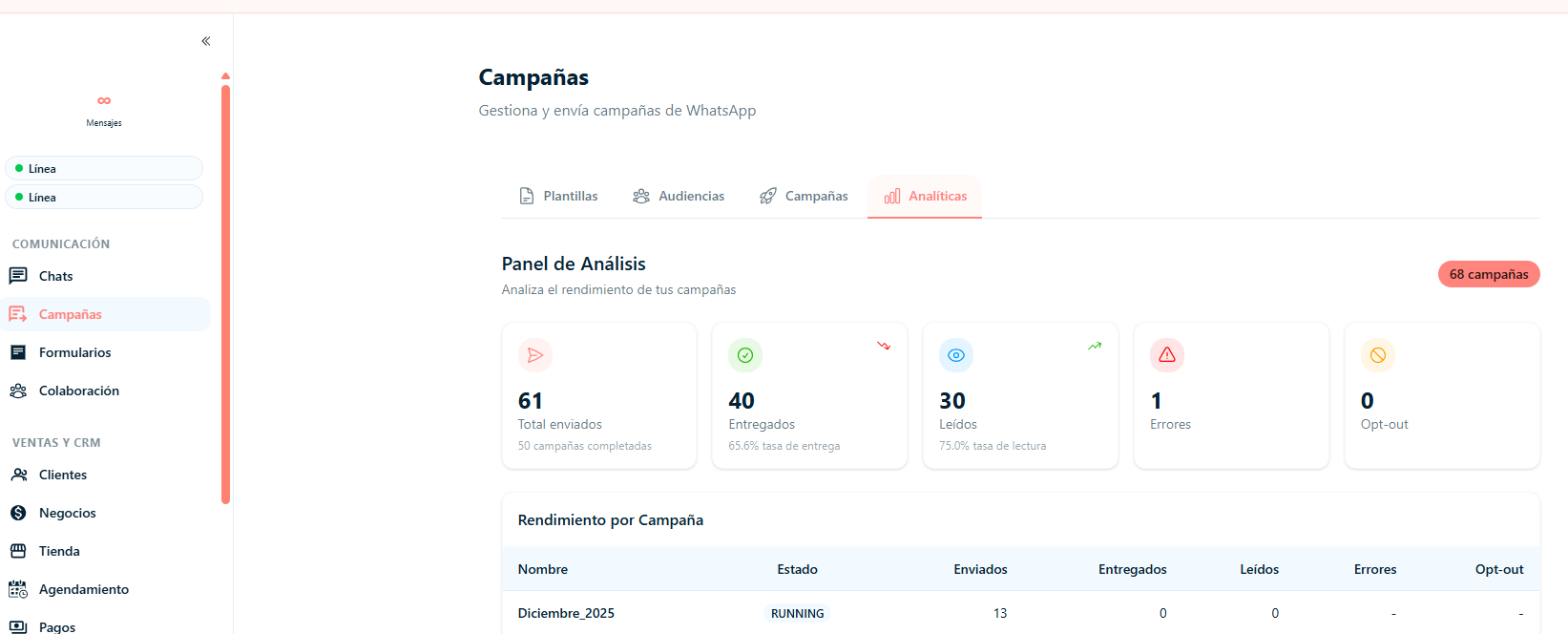
Analysis Panel
At the top you will find a general summary with key performance indicators:
Total sent: Total number of messages sent
Delivered: Number of messages received correctly, along with their delivery percentage
Read: Number of messages opened by recipients, including the read rate
Errors: Messages that could not be processed or delivered correctly
Opt-out: Users who asked to stop receiving communications
Performance by Campaign
At the bottom you will see the individual detail of each campaign:
Campaign name
Status (Running or Completed)
Number of messages sent, delivered, read
Errors recorded and opt-outs generated
What this section is for
Measure the effectiveness of your campaigns
Identify possible delivery failures
Analyze the level of interaction of your customers
Optimize future communication strategies
Make decisions based on real results
How to interpret the results:
Low delivery rate: It can point to invalid numbers, channel restrictions or configuration problems in the template
Low read rate: It may be related to the send time, the message content or the audience's interest
Errors recorded: Check the channel status and verify that the template is approved correctly
Opt-out: Monitor it to avoid communication overload